Device tracking
2 types of tracking are available in Screeb:
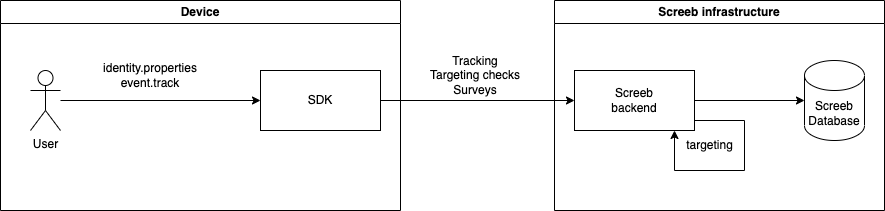
- Screeb tracking: events are transmitted to Screeb backend and are available for analytics in the admin panel.
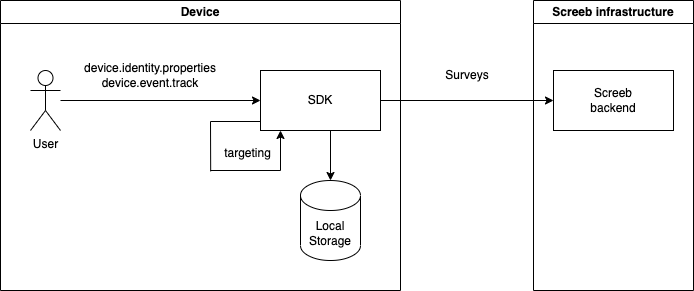
- Device tracking: events are stored into localStorage (browser) or internal device memory (mobile).
Summary
Screeb tracking
You will be able to collect events from multiple devices and attach it to a unique user identity. These data are made available to Screeb analytics.
Triggering a survey on a user event can involve a ~20 seconds delay.
1.1 Javascript Tag
init command:
$screeb('init', '<website-id>', {
  identity: {
    properties: {
      firstname: '<user-firstname>',
      lastname: '<user-lastname>',
      plan: '<user-plan>',
      last_seen_at: new Date(),
      authenticated: true,
    }
  }
});
identity command:
$screeb('identity', 'abcd-1234', {
  email: 'support@screeb.app',
  age: 42,
  logged: true,
  signed_up_at: new Date(),
});
identity.properties command:
$screeb('identity.properties', {
  email: 'support@screeb.app',
  age: 42,
  logged: true,
  signed_up_at: new Date(),
});
event.track command:
$screeb('event.track', 'Product added to cart');
Group assignation commands:
$screeb('identity.group.assign', 'company', 'Apple');
$screeb('identity.group.unassign', 'plan', 'Growth');
1.2 Android SDK
initSDK method:
Screeb.initSdk(this,
    "<android-channel-id>",
    "<unique-user-id>",          // optional
    VisitorProperties().apply {  // optional
        this["firstname"] = "<user-firstname>"
        this["lastname"] = "<user-lastname>"
        this["plan"] = "<user-plan>"
        this["age"] = 42
        this["logged_at"] = Date()
        this["authenticated"] = true
    }
)
setIdentity method:
Screeb.setIdentity("<unique-user-id>", VisitorProperties().apply {
    this["firstname"] = "<user-firstname>"
    this["lastname"] = "<user-lastname>"
    this["plan"] = "<user-plan>"
    this["age"] = 42
    this["logged_at"] = Date()
    this["authenticated"] = true
})
setProperties method:
Screeb.setProperties(
    VisitorProperties().apply {
        this["firstname"] = "<user-firstname>"
        this["lastname"] = "<user-lastname>"
        this["plan"] = "<user-plan>"
        this["age"] = 42
        this["logged_at"] = Date()
        this["authenticated"] = true
    }
)
Screeb.trackEvent method:
Screeb.trackEvent("Product removed from cart")
Group assignation commands:
Screeb.assignGroup("company", "Apple")
Screeb.assignGroup("plan", "Growth")
1.3 iOS SDK
initSDK method:
Screeb.initSdk(
   context: window?.rootViewController,
   channelId: "<ios-channel-id>",
   identity: "<user-id>", // optional
   visitorProperty: ["age": 12, "name": "JohnDoe"] // optional
)
setIdentity method:
Screeb.setIdentity(uniqueVisitorId: "<unique-visitor-id>", visitorProperty: [
    "age": 27,
    "category": "cycle",
    "purchasedAt": ISO8601DateFormatter().string(from: Date())
])
setProperties method:
Screeb.visitorProperty(visitorProperty: [
  "email": "support@screeb.app",
  "age": 29,
  "logged": true,
  "signed_up_at": ISO8601DateFormatter().string(from: Date()),
])
Screeb.trackEvent method:
Screeb.trackEvent(name: "Product removed from cart", trackingEventProperties: [:])
Group assignation commands:
Screeb.assignGroup(type: "company", name: "Apple")
Screeb.unassignGroup(type: "plan", name: "Growth")
1.4 ReactNative SDK
initSDK method:
initSdk(
  "<channel-id>",
  "<user-id>",
  {
     'example-prop1': false,
     'example-prop2': 29,
     'example-prop3' : 'iPhone 13',
  }
);
setIdentity method:
setIdentity('abcd-1234', {
    'example-prop1': false,
    'example-prop2': 29,
    'example-prop3': 'iPhone 13',
});
setProperties method:
setProperties({
    'example-prop1': false,
    'example-prop2': 29,
    'example-prop3': 'iPhone 13',
});
trackEvent method:
trackEvent("Product removed from cart");
Group assignation methods:
assignGroup("company", "Apple");
unassignGroup("plan", "Growth");
1.5 Flutter SDK
initSDK method:
PluginScreeb.initSdk("<channel-id>", properties: <String, dynamic>{
    'isConnected': true,
    'age': 27,
    'company' : 'Screeb',
    'technology' : 'iOS',
    'flutterAccount' : true
});
setIdentity method:
PluginScreeb.setIdentity("<user-id>", <String, dynamic>{
    'isConnected': true,
    'age': 27,
    'company' : 'Screeb',
    'technology' : 'iOS',
    'flutterAccount' : true
});
setProperties method:
PluginScreeb.setProperties("<user-id>", <String, dynamic>{
    'isConnected': true,
    'age': 27,
    'company' : 'Screeb',
    'technology' : 'iOS',
    'flutterAccount' : true
});
trackEvent method:
PluginScreeb.trackEvent("Product removed from cart");
Group assignation methods:
PluginScreeb.assignGroup("company", "Apple");
PluginScreeb.unassignGroup("plan", "Growth");
Device tracking
Events are stored locally on the user device and won't be available for analytics in the Screeb console.
If users use your application from multiple devices, the targeting rules will be checked against local events only. Since Screeb does not receive these events, privacy is even better.
Device tracking has a low retention policy:
- up to 90 days
- up to 2.000 events
Expect at most 150ko in browser localStorage.
Triggering a survey on a user event will display the survey instantly.
2.1 Javascript Tag
init command:
$screeb('init', '<website-id>', {
  identity: {
    id: "user-id-123",
    device: {
      properties: {
        firstname: '<user-firstname>',
        lastname: '<user-lastname>',
        plan: '<user-plan>',
        last_seen_at: new Date(),
        authenticated: true,
      }
    }
  }
});
device.identity.properties command:
$screeb('device.identity.properties', {
  email: 'support@screeb.app',
  age: 42,
  logged: true,
  signed_up_at: new Date(),
});
device.event.track command:
$screeb('device.event.track', 'Product added to cart');
Group assignation:
[currently not available]
2.2 Android SDK
[currently not available]
2.3 iOS SDK
[currently not available]
2.4 ReactNative SDK
[currently not available]
2.5 Flutter SDK
[currently not available]
Screeb tracking vs device tracking
If you need events or properties for analytics or response analysis in Screeb, you should use the Screeb tracking.
For applications having a high volumetry of events mainly used to display surveys, you should use the device tracking.
| Screeb tracking | Device tracking | |
|---|---|---|
| 👍 | * Survey Advanced Targeting * Segment Analytics * Funnel Reports * Response Analysis based on user properties | * lower time to display surveys * higher volume of events used for survey displays |
| 👎 | * higher delay to display a survey * lower volumes of events allowed in your subscription | * Partial information on Screeb Homepage * No access to Segment Analytics, Funnel Reports * No responses analysis based on user properties * No variables in questions based on device properties |
Identity properties and events cannot be declared twice, in different locations (Screeb or device). When a mix is necessary, please use a different name.